

Point cloud software has become an indispensable tool for capturing real-world data and converting it into actionable digital models. Two prominent players in this space are Nest 3D and PointCab- powerful, yet tailored for slightly different workflows.
In this blog, discover the features, usability, and integration capabilities that help CAD professionals make informed decisions when handling point cloud data.
Understanding Point Cloud Software
Point cloud software allows users to process millions of spatial points collected from 3D laser scanners or photogrammetry. These points represent the geometry of physical spaces, structures, and objects with remarkable accuracy. These point clouds are used for:
- As-built capturing and documentation.
- Generating precise measurements for construction and retrofitting.
- Creating 3D visualizations for simulation, analysis, or client presentations.
A robust point cloud software ensures a smooth transition from raw scanning data to detailed models. It’s the bridge between reality and CAD, making solutions like Point Cloud to CAD software ideal for engineers seeking efficiency and accuracy.
Nest 3D: Highlights and Advantages
Nest 3D has quickly gained popularity among surveyors and architects due to its combination of performance, usability, and integration options.
Key Features:
- Variety automation levels: Offers a wide range of automation levels for transformation point cloud into digital assets. The user can optimize the need for controlling the project or having fully automated process that saves time and manpower
- High-Fidelity Data Processing: Nest 3D can handle extremely dense point clouds with minimal lag, making it ideal for any scale projects.
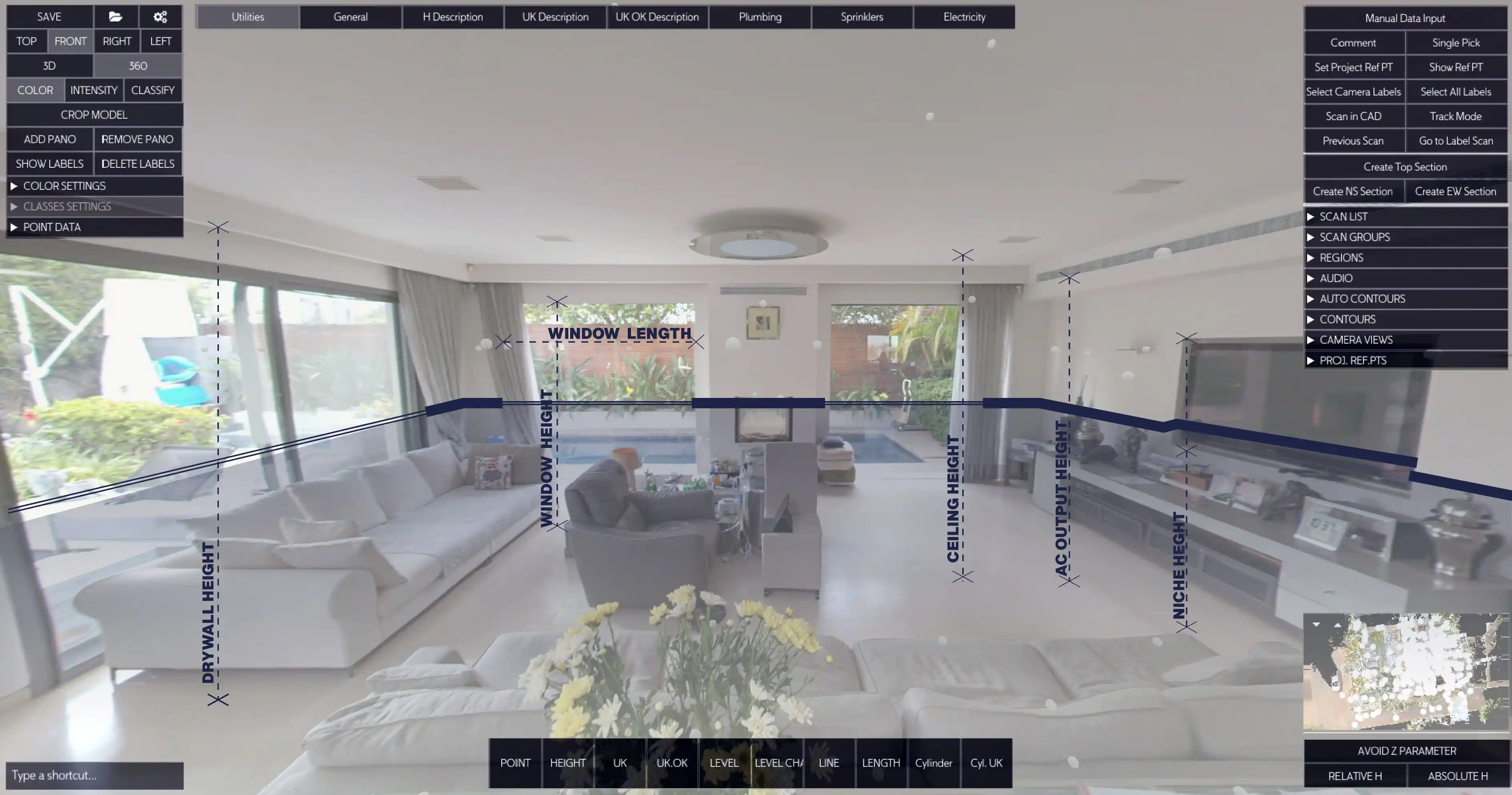
- Seamless 3D Point Cloud to CAD Conversion: It offers built-in tools that convert scanned point clouds directly into editable CAD models, significantly reducing post-processing time.
- AutoCAD Point Cloud Plugin Compatibility: Engineers can import Nest3D data directly into AutoCAD via dedicated plugins. This, in turn, streamlines workflows and avoids redundant data conversions.
- Advanced Visualization Tools: Users can manipulate, colour-code, and filter point clouds to highlight structural elements, detect anomalies, or prepare client-ready visuals.
- User-Friendly Interface: Unlike some complex alternatives, Nest 3D is designed to be intuitive without sacrificing technical depth.
Advantages for Engineers:
For professionals working on renovation, retrofitting, or detailed architectural surveys, Nest3D’s ability to handle 3D point cloud to CAD conversions efficiently makes it an asset. Engineers appreciate the accuracy and the minimal manual adjustments required after conversion. Its point cloud software capabilities also extend to clash detection, volumetric analysis, and precise measurement extraction, all within the same platform.
PointCab: Features and Strengths
PointCab remains a widely used tool for point cloud processing, particularly appreciated for its speed and project management features.
Key Features:
- Fast Point Cloud Rendering: PointCab is designed for quick visualization of large datasets, allowing engineers to review scans rapidly.
- Versatile Export Options: The software supports multiple formats, including those that are compatible with Point Cloud to CAD software and various BIM platforms.
- Intuitive Slicing and Sectioning Tools: Users can extract 2D plans or sections directly from point cloud data for design validation.
- Lightweight System Requirements: PointCab runs efficiently on standard hardware, making it accessible for smaller firms or individual professionals.
Strengths:
PointCab is excellent for users who need rapid data assessment and straightforward integration into existing workflows. Its sectioning tools and project management features make it a reliable choice for those prioritizing speed.
Nest 3D Vs PointCab: Comparative Insights
When comparing Nest 3D and PointCab, several distinctions emerge, particularly in technical depth and workflow integration.
Both tools serve engineers effectively, but Nest 3D leans slightly towards a more integrated, high-precision workflow, while PointCab focuses on speed and lightweight operations.
Practical Use Cases for Point Cloud Software
Point cloud software solutions cater to different engineering needs. Let’s take a look at them.
- Architectural Renovation:
- Nest 3D: Ideal for detailed 3D point cloud to CAD conversions, creating accurate plans for restoration.
- PointCab: Useful for quickly reviewing scans and generating preliminary floor plans.
- Construction Planning:
- Nest 3D: Enables clash detection and volumetric analysis within the same platform.
- PointCab: Facilitates rapid extraction of sections and layouts for early-stage assessments.
- Infrastructure Surveys: Both platforms can manage large datasets, but Nest 3D’s advanced filtering tools allow for more precise measurements in complex environments.
Tips for Maximizing Workflow Efficiency
To get the best results from point cloud software, consider these professional tips:
- Always work in the final drafting software (AutoCAD, BricsCAD, ZWCAD)
- Always check hardware compatibility; high-density scans require robust systems, especially for Nest 3D.
- Leverage the AutoCAD point cloud plugin support to ensure smooth integration into existing design workflows.
- Use filtered views to focus on critical structural elements. This reduces the processing times and improves clarity.
- Consider combining software strengths: initial scanning in PointCab for speed, followed by Nest 3D for detailed CAD conversion.
Choosing the right Point Cloud Software
The project requirements, dataset complexity, and workflow preferences. While PointCab continues to be a strong option for professionals seeking speed and straightforward visualization, Nest3D offers advanced 3D point cloud to CAD capabilities. Get access to seamless AutoCAD point cloud plugin integration and precision tools that support high-level engineering decisions with our 14-day free trial.
For those exploring new ways to integrate point cloud data into CAD systems, experimenting with Nest 3D alongside other platforms may unlock the full potential of their datasets.
Turn Point Clouds into CAD in Seconds
Cut drafting time by 60 percent and deliver accurate DWG drawings without manual tracing. Try Nest3D free for 14 days with no credit card required.
Get Started for Free
.svg)


.svg)
